


Generally, regular 3D printer maintenance is the only way to ensure your machine remains reliable and accurate over hundreds of hours of production. Specifically, the extruder and nozzle assembly require the most consistent attention because they are subject to constant heat and friction. A proactive cleaning schedule not only prevents sudden print failure but also extends the life of your expensive hotend components. Furthermore, proper maintenance is vital to prevent “heat creep.” This is a condition where heat travels up the extruder and melts the filament too early, causing a catastrophic jam.
Preventing and Clearing 3D Printer Nozzle Clogs
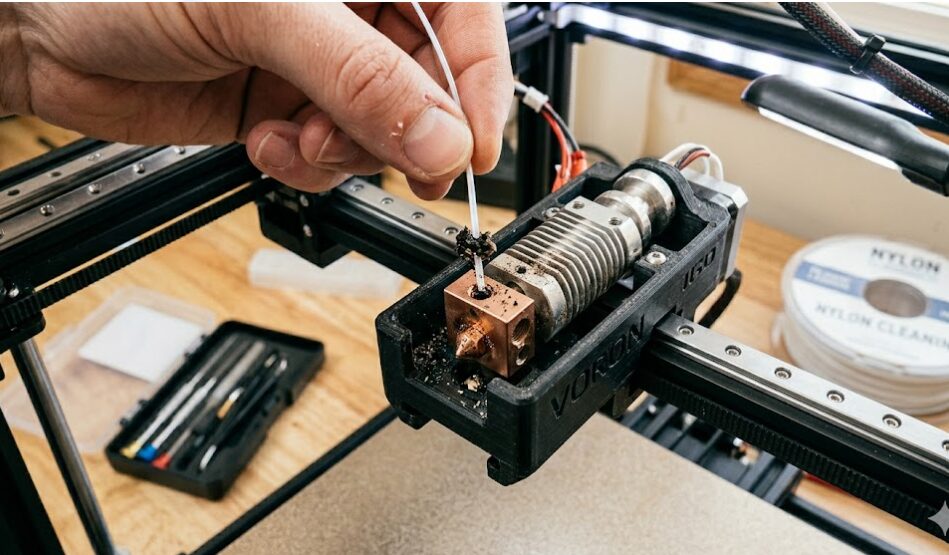
Similarly, a clogged nozzle is usually the result of burnt filament or dust entering the hotend. In addition, changing from a high-temperature material like PETG to a low-temperature material like PLA can lead to a partial clog. To avoid this, you should perform a “cold pull” every 20-30 hours of operation. To begin, a cold pull involves heating the nozzle, pushing filament through, and then quickly pulling it out as it cools. This action successfully removes any stubborn debris or carbonized plastic.
If a severe clog does occur, a dedicated 3D Nozzle Cleaning Kit is an essential tool. These kits typically include acupuncture needles, specialized wrenches, and replacement nozzles. Generally, we recommend simply replacing a brass nozzle rather than trying to clear a hardened clog, as a new nozzle guarantees perfect geometry.
The 2026 3D Printer Maintenance Checklist
To maintain optimal performance, follow this simple schedule.
Every 20-30 Hours
- Perform a cold pull to clean the nozzle internal channel.
- Wipe down the print surface with 99% isopropyl alcohol to remove oils.
Monthly (Every 100 Hours)
- Lubricate linear rods and rails with silicone-based lubricant.
- Check belt tension on the X and Y axes to prevent layer shifting.
- Inspect the extruder gear for plastic buildup and clean with a brass brush.
Every 6 Months (Or If Error Occurs)
- Re-calibrate your input shaping and pressure advance settings, especially if you have moved the printer.
- Update your firmware to the latest manufacturer version. Indeed, this ensures you are using the most current AI-assisted error detection software. For further hardware setup tips, return to the core 3D Printer Guide.
FAQ: 3D Printer Clog Maintenance
Typically, under-extrusion, weak layer bonds, or a clicking sound coming from the extruder motor are the first signs of a partial clog.
No, it can also be caused by incorrect tension on the extruder gear or a temperature that is set too low for the current filament.
No, it can also be caused by incorrect tension on the extruder gear or a temperature that is set too low for the current filament.
Generally, yes, but you must be careful not to overheat the external mating surfaces. Furthermore, never torch a brass nozzle as it will easily melt or deform.
Eventually, maintaining a reliable machine requires a proactive approach. For further information on general print settings and environmental safety, return to our standard 2026 Guide to 3D Printing.

Recent Comments