


Successful 3D printer calibration is the fundamental bridge that takes your production quality from “good” to “perfect.” Because every unique spool of filament behaves slightly differently, precision tuning allows you to dial in the exact “sweet spot” for that specific roll of plastic. Furthermore, running a calibration suite is the only reliable method to eliminate stringing and weak layer bonds. In fact, a small increase in accuracy can drastically reduce post-processing time and prevent total print failure. Ultimately, this approach saves you both time and material in the long run.
Tuning Your Optimal Material Performance with Temperature Towers
To start, a temperature tower helps you rapidly identify the ideal nozzle heat for a unique material. by printing a vertical stack that changes temperatures at specific intervals, you can visually inspect the exact temperature that provides the best surface finish and the strongest layer adhesion. In 2026, many high-speed machines now require PLA to be printed closer to 230°C to achieve a fast volumetric flow rate. Similarly, a specialized material like Carbon Fiber PETG may need 255°C for the best inter-layer bond strength. Consequently, a temperature tower is not a “once and done” test.
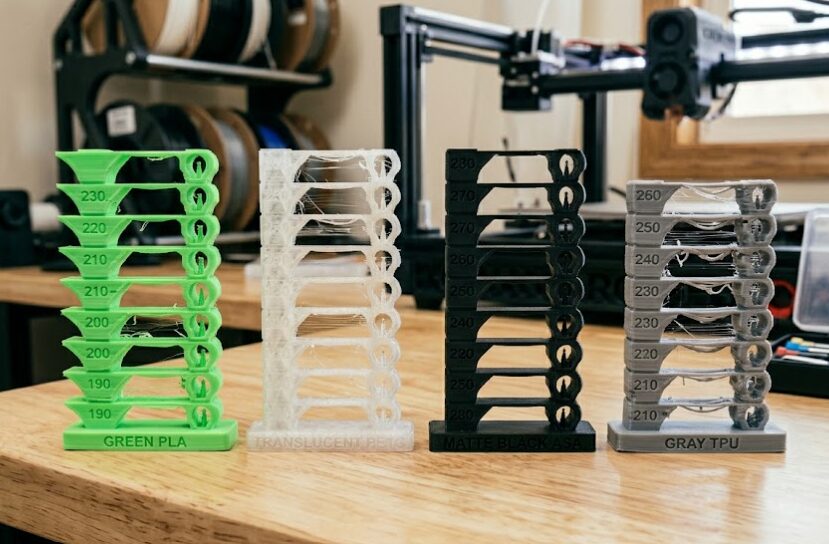
A lineup of four 3D-printed temperature calibration towers, demonstrating the print quality across different filament types: bright green PLA, translucent PETG, matte black ASA, and gray TPU, showing variations in bridging, stringing, and detail for each material.
3D Printer Calibration to Eliminate Stringing with Retraction Tests
In addition to temperature, your retraction settings control how much filament is pulled back during the travel moves. When the nozzle moves from one pillar to another without printing, a lack of retraction causes significant material “oozing.” Typically, this creates the messy “spiderwebs” known as stringing. To avoid this, you should use a dedicated retraction test pattern. These models allow you to test variations of retraction distance and speed. For instance, increasing retraction by just 0.5mm often eliminates all fine stringing without causing under-extrusion. If your printer has the necessary hardware, look into Pressure Advance tuning to further manage filament ooze. For a full hardware break down see the core 3D Printer Guide.

Recent Comments